
Know what the platform costs
Public pricing, plan limits, and booking fees are visible before an operator books a demo or changes their booking process.
Run your rental business from one workspace. Take direct bookings, collect payments through Stripe Connect, and manage guest waivers, refundable damage deposits, and check-in.
5/5
fresh operator onboarding drills completed
765
automated application tests passing
43
public routes checked on desktop and mobile
Launch verification uses isolated synthetic operators and fictional demo records. These are product-readiness results, not customer-performance claims.
A booking platform should help you sell online without hiding fees, taking over the payment relationship, or scattering waivers, refundable damage deposits, and day-of work across disconnected tools.
Public pricing, plan limits, and booking fees are visible before an operator books a demo or changes their booking process.
Stripe Connect lets operators use their own Stripe account while Stripe controls payout timing, processing fees, and connected-account money movement.
Waiver evidence, refundable damage deposits, guest counts, notes, staff context, and check-in status live with the booking record.
Operators should be able to understand the monthly cost and per-booking fee before they spend time in a demo.
ReservKit uses Stripe Connect so customer payments route through Stripe instead of a platform-owned payment relationship.
Customers can sign digital waivers before arrival. Signed records stay tied to the booking with identity checks, timestamps, signature evidence, and audit details.
Check-in lists, payment status, waiver status, guest counts, and assigned work should be visible before the first group arrives.
The risky part is not buying new software. It is changing your booking flow without breaking your season. Guided setup is built around a tested switch: one working activity, one payment path, one waiver path, and one booking link before you move traffic.
Activities, durations, refundable damage deposits, waiver needs, staff handoffs, cutoff rules, and the links customers use today.
Set up your first bookable activity, Stripe account, availability, waiver requirements, and customer confirmation flow.
Run a real test booking end to end so you see the customer flow, operator record, payment handoff, and waiver path before launch.
Early operators are usually not looking for more software. They are looking for a booking path they can explain to staff, test end to end, and move traffic to without losing control of payments or day-of work.
"We need customers to book online, but we still need staff to know who paid, who signed, what gear is held, and what needs attention before the trip."
"We are not trying to rebuild every back-office process on day one. We need one clean activity, one payment path, and one booking link we can trust."
"The booking fee, Stripe setup, waivers, deposits, and check-in flow all have to be understandable before we point real customers at it."
ReservKit helps rental and experience operators take direct bookings, collect Stripe payments, manage waiver evidence, and run day-of operations from one workspace.
Booking page
Customers choose an activity, review availability, enter guest details, and move toward checkout without phone tag.
Stripe payments
ReservKit creates the Stripe Connect checkout flow and routes the connected-account payment through Stripe. Stripe controls payout timing, processing fees, and connected-account money movement.
Waivers
Attach one or more waiver templates to an activity. Guests verify by email, sign before the trip, and the signed record stays tied to the booking with audit details.
Day-of operations
Your team can see arrival readiness, assignments, waiver status, and operational notes before the group shows up. Owners and admins keep revenue reporting separate.
If your business does tens of thousands in monthly bookings, small booking-fee differences become real money. ReservKit keeps the model visible: monthly plan plus a published booking fee, with lower rates on higher-volume plans.
See the pricing pageIllustrative fee calculation
$60k/mo
At that volume, a 1 percentage point fee difference is about $600/month before processing fees. Operators should be able to see the math before committing to a platform.
Every plan includes unlimited bookings. Pay less per booking as your operation grows, with a firm monthly booking-fee cap on Pro.
1.5% booking fee
Unlimited bookings
14-day free trial
For small operators who need the core direct-booking workflow.
1% booking fee
Unlimited bookings
14-day free trial
For growing teams that need unlimited bookings, waivers, reports, coupons, refundable damage deposits, add-ons, and named equipment-unit blocking.
0.5% booking fee
$900/month booking-fee cap
14-day free trial
For higher-volume teams needing deeper operational support.
Contracted booking fee
Unlimited bookings
For multi-location operators with custom rollout, migration, or support needs.
Start with 14 days of full access, connect Stripe when you are ready, and choose a paid plan before the trial ends. Every paid plan includes unlimited bookings.
No public Free plan or booking caps. Your 14-day trial includes the full operator workflow so you can configure and test before choosing a paid plan.
Stripe charges its standard processing fees directly to the operator’s connected account. ReservKit’s booking fee applies only to the eligible booking subtotal and is not added as a separate customer checkout surcharge. Tips, taxes, operator service fees, and refundable damage deposits are not marked up. Stripe does not return its original processing fee after a refund. ReservKit returns its booking fee for full operator, weather/safety, duplicate-payment, or system-error refunds; it retains the fee for customer cancellations, no-shows, and partial refunds.
ReservKit connects bookings, payments, waivers, and staff in one place. These representative screens use demo activities, customer records, and amounts from Clearwake Watersports Demo, not real customer results. Activity photos are AI-generated illustrations. Feature access depends on your plan.
Activities
Activities carry the customer-facing photos, descriptions, locations, pricing, duration, capacity, and waiver setup that power the live booking page.

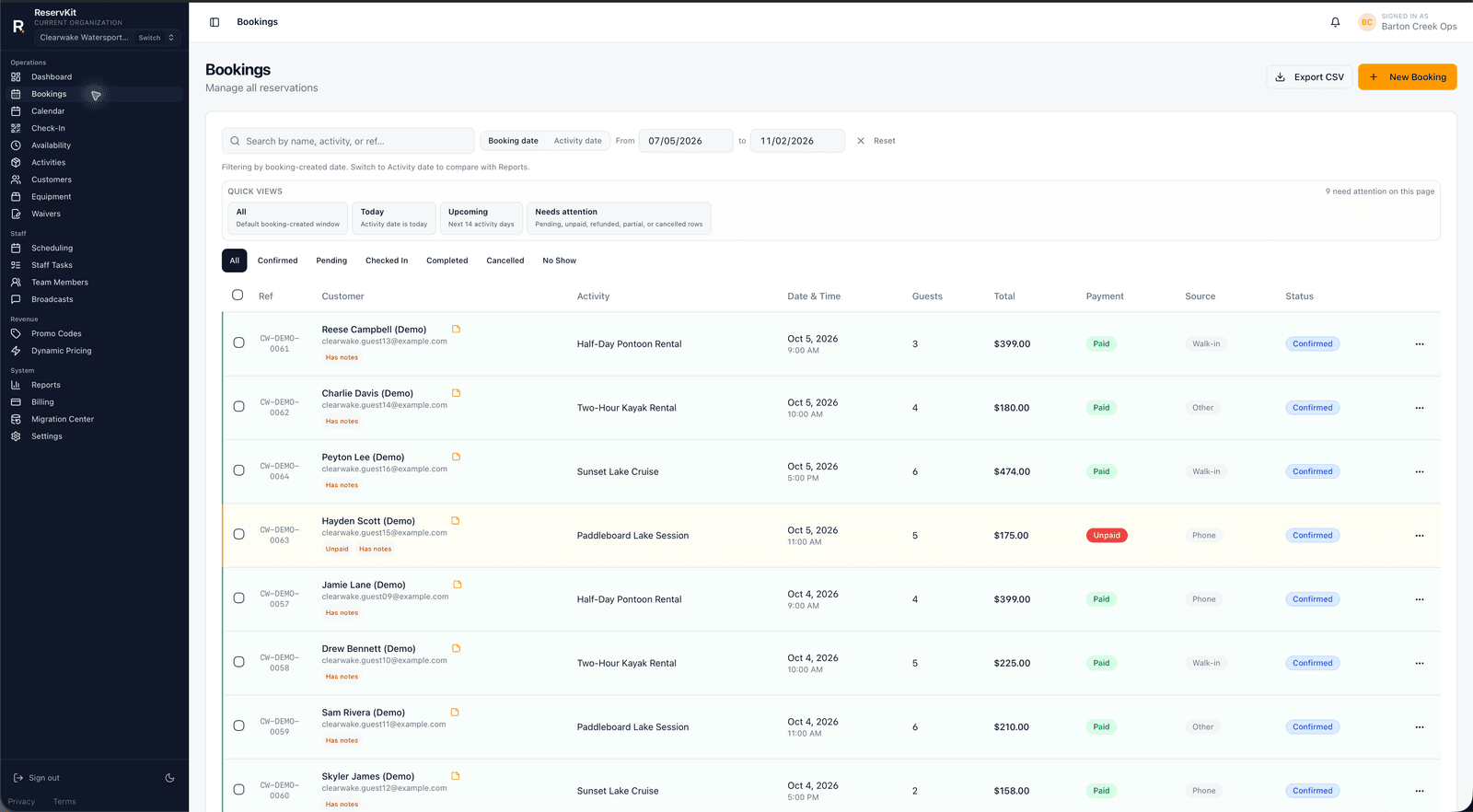
Bookings
Scan reservations by customer, activity, date, guest count, amount, and payment state. Open Booking Detail for waiver progress, staff assignments, balances, and operator notes.

Day-of operations
The check-in manifest separates ready bookings from the ones that need attention. Staff can mark arrivals, verify waivers, and track the day without a group text.

Waivers
Create waiver templates and choose the signer details your business needs. Attach templates to activities, then review completed signer evidence from the booking after guests verify their email and sign.

Reports
Reports separate booking income from customer tips, show booking fees, and make activity performance easier to review by date range.

Setup is focused on a working booking path: Stripe, one activity, waivers, and a test booking before you share the link.
Link your existing Stripe account or create one before taking paid bookings.
Name it, set pricing, guest limits, availability windows, and cutoff rules.
Build your waiver templates once, then assign the required templates to each activity.
Go through the full customer flow yourself before sharing with anyone.
Add the tested booking link to the places customers already find you.
ReservKit is live booking software for operators who need the core path before they switch traffic: direct bookings, Stripe payments, waiver evidence, refundable damage deposits, check-in, staff context, reports, and optional guided setup.
The homepage uses real ReservKit screens from configured public booking and operator workflows, with captures reviewed before broader marketing.
Payments are designed around your Stripe account instead of a platform-owned payment relationship.
Start with one working booking flow, run a test booking, then decide when to move real traffic.
Operators deserve to know what they owe, keep the payment relationship in their own business, and get set up without a weeks-long evaluation process. That is why I built ReservKit.
Yes. Rental, tour, and experience operators can start with a 14-day full-access trial, build and test the first booking flow, and choose Starter, Growth, or Pro from Billing before the trial ends.
Yes. Guided onboarding is built around switching safely: configure activities, availability, waivers, Stripe, booking rules, and test bookings before sharing your ReservKit link. Existing data migration depends on the export available from your current platform.
Customers pay through Stripe Checkout. ReservKit uses Stripe Connect to create the checkout flow and route the connected-account payment through Stripe.
No. Customers can book, pay, sign required waivers, and receive their confirmation without creating a ReservKit account.
Public plans are Starter ($69/mo + 1.5%), Growth ($199/mo + 1%), Pro ($399/mo + 0.5% with a $900 monthly booking-fee cap), and Enterprise custom. Every plan includes unlimited bookings, and self-serve plans begin with a 14-day free trial.
Start a 14-day full-access trial, build one working booking flow, and request guided setup help when you want a second set of eyes before sharing your link.
Start 14-day trialPricing is published upfront. Monthly plans can be cancelled from the billing portal.